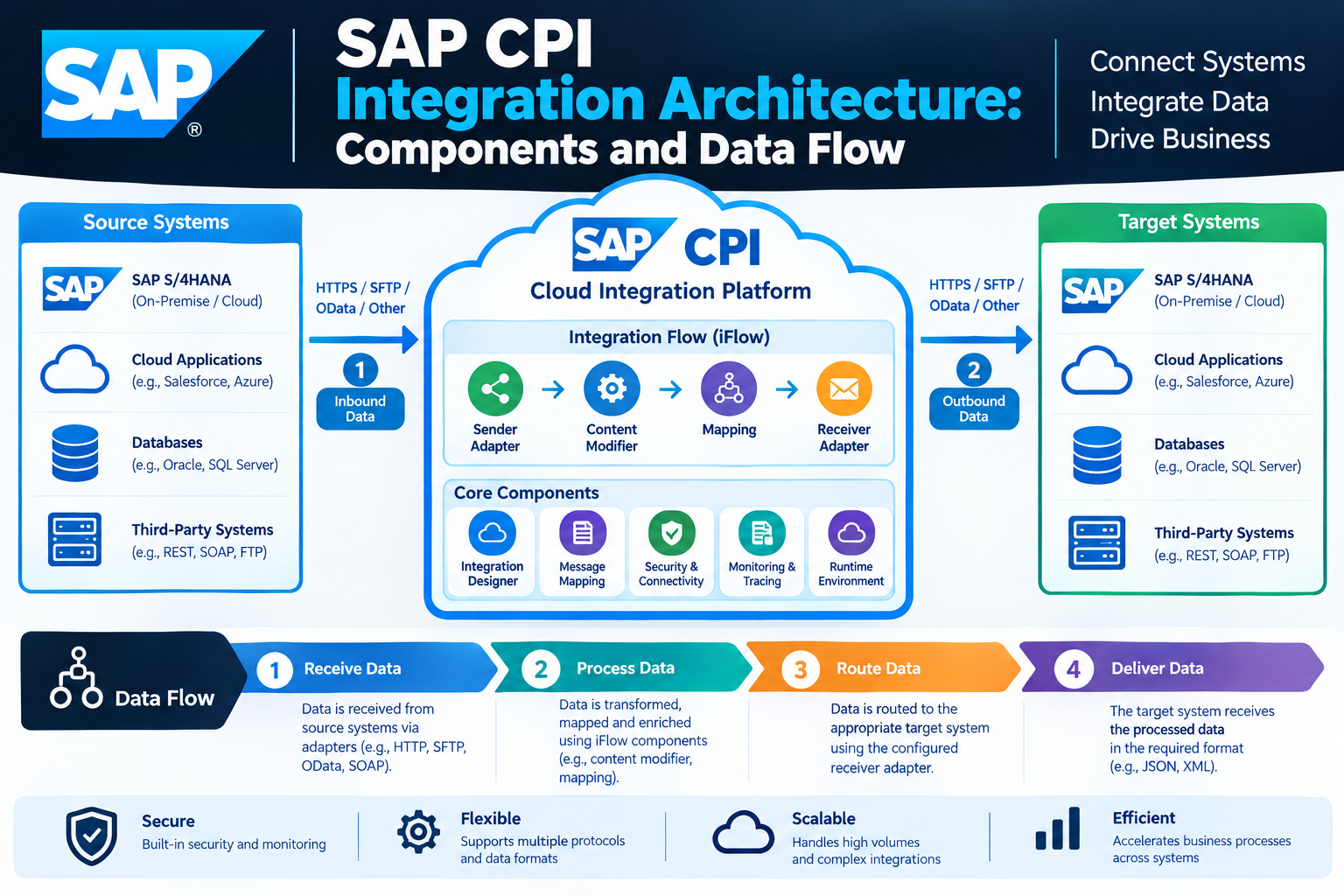
SAP CPI Integration provides a structured way to connect SAP applications, non-SAP applications, cloud platforms, and on-premise systems. It manages how business data moves between different systems and defines how messages are received, processed, transformed, routed, and delivered. SAP currently provides Cloud Integration as a capability within SAP Integration Suite on SAP Business Technology Platform (SAP BTP). It supports application-to-application (A2A), business-to-business (B2B), and business-to-government (B2G) integration scenarios across cloud, on-premise, and hybrid environments.
The architecture of SAP CPI Integration is based on integration flows, also known as iFlows. An integration flow defines the sender, receiver, communication adapters, processing steps, and message flow required for an integration scenario. This architecture allows organizations to control data movement without requiring every application to communicate directly with every other application.
What Is SAP CPI Integration Architecture?
SAP CPI Integration architecture describes the components and processing stages used to transfer data between connected systems. The architecture normally begins with a source or sender system, passes the message through an integration flow, processes the data according to defined rules, and sends the result to one or more receiver systems.
An integration flow acts as the central processing model. SAP documentation explains that an integration flow specifies how a message is processed on the tenant. Developers can define senders and receivers, communication adapters, and message-processing steps within the graphical integration flow editor.
For example, an organization may receive a sales order from an e-commerce platform. SAP CPI Integration can receive the order, validate its content, transform the data into an SAP-compatible structure, enrich the message with additional information, and send it to SAP S/4HANA.
Main Components of SAP CPI Integration Architecture
The architecture contains several important components that work together. Each component has a specific role in the movement and processing of business data.
Integration Package
An integration package provides a logical container for integration artifacts. It can contain integration flows and other artifacts used within an integration project. SAP documentation describes packages as a way to organize artifacts such as integration flows, value mappings, and APIs.
For example, a company could create a package called Global_Sales_Integration and place multiple sales-related integration flows inside it. This organization makes integration content easier to manage and maintain.
Integration Flow or iFlow
The integration flow is the central design component of SAP CPI Integration. It describes how a message travels through the integration runtime.
An iFlow can contain sender and receiver participants, adapters, processing steps, mapping, routing, filtering, scripts, and other integration components. Message flows connect the different elements and determine the processing sequence.
A simple architecture can be represented conceptually as:
Sender System → Sender Adapter → Integration Process → Processing Steps → Receiver Adapter → Receiver System
This model can become more complex when the integration requires multiple receivers, conditional routing, enrichment, asynchronous processing, or error handling.
Sender
The sender is the system or application that starts or provides the message. It can represent an SAP application, cloud application, partner system, web application, or another connected source.
For example, SAP S/4HANA could send an IDoc containing customer information, while an external application could send an HTTP request containing an order.
Receiver
The receiver is the system that receives the processed message. A receiver can be an SAP application, third-party application, database, SFTP server, web service, or another supported endpoint.
A single integration scenario can contain different sender and receiver combinations depending on the business process.
Adapters
Adapters provide the technical connection between external systems and the Cloud Integration runtime. SAP documentation describes adapters as the mechanism used to specify the technical protocols for connecting senders and receivers to the integration flow.
The appropriate adapter depends on the communication technology used by the connected system. Common technologies include HTTP, HTTPS, SOAP, SFTP, OData, IDoc, and other supported protocols.
For example, an HTTPS sender adapter can receive a web request, while an SFTP receiver adapter can deliver a processed file to an external server.
Message Processing in SAP CPI Integration
After a message enters the integration flow, it can pass through multiple processing steps. These steps determine what happens to the message before it reaches the receiver.
SAP Cloud Integration provides different processing capabilities for tasks such as transformation, routing, filtering, content modification, scripting, splitting, joining, and external service calls.
A message may therefore follow a sequence such as:
Receive → Validate → Transform → Enrich → Route → Deliver
The actual sequence depends on the business requirement.
Content Modifier
A Content Modifier can change or add message content, headers, and properties during processing. It can be used when an integration needs to add information, modify message values, or prepare data for a later processing step.
For example, an integration flow could add a business identifier or set a property before the message is routed to another system.
Message Mapping
Message mapping is used when the structure of the source message differs from the structure expected by the target system.
For example, an e-commerce application may use:
customer_name
while the target SAP application expects a different field structure.
A mapping can establish the relationship between source and target fields and apply functions where required. SAP Cloud Integration supports message mapping with supported source and target structures and provides mapping functions for transforming data.
Router
A Router allows the integration flow to select different processing paths based on defined conditions.
For example, an order integration could route messages according to country:
Germany → SAP S/4HANA Germany
France → SAP S/4HANA France
United Kingdom → UK Processing Flow
This makes conditional processing possible within a single integration architecture.
Filter
A Filter can prevent unwanted messages or message content from continuing through a particular processing path. It is useful when only specific records or conditions should be processed.
Script
Scripts can provide custom processing logic when standard integration-flow steps are not sufficient. SAP documentation identifies script processing as a supported integration capability, including Java or Groovy-based scripting depending on the supported feature and scenario.
Scripts should be used carefully because every processing step consumes tenant resources. SAP recommends designing integration flows with resource usage, resilience, and maintainability in mind.
SAP CPI Integration Data Flow
The data flow describes how a message moves from the source system to the target system. The message normally enters through a sender adapter and then passes through the processing steps defined in the integration flow.
Consider an employee synchronization scenario.
An HR application sends employee information to SAP CPI Integration through an HTTPS endpoint. The sender adapter receives the message and passes it into the integration process. A validation step checks the message, a mapping step converts the source structure into the required target structure, and a Router can determine the correct processing path. The receiver adapter then sends the transformed message to the target SAP system.
The basic flow can be represented as:
Source Application → Adapter → Integration Flow → Transformation → Routing → Receiver Adapter → Target Application
This architecture separates business processing logic from the technical communication method.
Synchronous and Asynchronous Data Flow
SAP CPI Integration can support different processing patterns depending on the integration scenario.
In a synchronous process, the sender expects a response during the same interaction. A request can be received, processed, sent to a receiver, and the resulting response can be returned to the sender.
In an asynchronous process, the sender does not necessarily wait for the complete downstream processing to finish. Messaging and other integration patterns can be used when systems need to exchange information without maintaining a continuous synchronous interaction.
The correct pattern depends on requirements such as response time, transaction behavior, system availability, message volume, and business process design.
Security in SAP CPI Integration Architecture
Security is an important part of the architecture because integration flows exchange business information between different systems.
Authentication and authorization methods depend on the adapter and communication scenario. SAP Integration Suite supports different authentication options for integration-flow endpoints and connections to external systems.
Secure communication protocols should be used when supported by the connected systems. SAP design guidance recommends encrypted protocols for secure communication with remote systems.
Security can involve certificates, credentials, OAuth-based authentication, roles, authorization, and secure protocol configurations. The exact configuration should match the requirements of the sender and receiver systems.
Error Handling and Monitoring
A production integration architecture needs mechanisms for detecting and managing processing failures. An integration flow can fail because of invalid data, authentication problems, unavailable receiver systems, communication errors, mapping problems, or incorrect processing logic.
SAP’s enterprise-grade integration guidance emphasizes resilience, graceful failure handling, supervision, resource management, and loose coupling. These characteristics help reduce the effect of failures on business processes.
Monitoring is also important because integration teams need to determine whether messages were successfully processed. When an error occurs, developers can investigate the message-processing sequence and identify the stage where processing stopped.
SAP CPI Integration Runtime and Deployment
Designing an integration flow does not automatically make it active for business processing. The integration content must be deployed to the runtime environment.
SAP explains that developers first design integration content and then deploy it. After deployment, the integration flows can operate and exchange data with connected sender and receiver systems. Cloud and on-premise systems can participate in these scenarios.
This creates an important distinction between design time and runtime. Design time is where developers configure the integration flow. Runtime is where the deployed flow processes actual business messages.
Naming Conventions for Integration Architecture
Consistent naming is important when an organization manages many integration flows. SAP provides naming guidelines for integration flows, participants, channels, mappings, and other artifacts.
For example, SAP documentation gives integration-flow naming patterns such as:
Global_MM_PurchaseOrder
and participant names such as:
OP_ERP
Channel names can use a pattern such as:
HTTP_RCV_PurchaseOrderCreate
Clear naming helps developers understand the purpose of an artifact without opening every configuration screen. SAP also recommends meaningful, generic names rather than technical or environment-dependent names.
SAP CPI Integration Architecture Example
Consider a retail company that receives orders from an online store and sends them to SAP S/4HANA.
The online store acts as the sender. It sends an order message to an HTTPS endpoint. The sender adapter receives the request and passes it into the integration flow.
The integration flow validates the incoming message and uses Message Mapping to convert the e-commerce structure into the format required by SAP S/4HANA. A Content Modifier can add required values, while a Router can send different orders through different processing paths.
The receiver adapter then sends the transformed order to SAP S/4HANA. If the target system requires a response, the integration can process the response and return the required information to the original sender.
This architecture avoids creating a direct custom connection between every application. Instead, Cloud Integration provides a controlled integration layer where connectivity, transformation, routing, security, and monitoring can be managed.
Best Practices for SAP CPI Integration Architecture
A well-designed architecture should keep integration flows understandable and maintainable. SAP’s enterprise-grade guidance emphasizes high availability, resilience, resource management, loose coupling, graceful failure handling, and readability.
Keep integration flows focused on clear business responsibilities. Avoid unnecessary processing steps because each step can consume runtime resources. SAP specifically notes that processing steps consume resources such as CPU processing time and RAM, with some components having greater resource impact than others.
Use secure authentication methods and encrypted communication protocols where supported. Keep credentials and security artifacts managed through appropriate platform mechanisms rather than embedding sensitive information directly into processing logic.
Use meaningful names for packages, integration flows, channels, and mappings. Consistent naming makes large integration landscapes easier to operate and troubleshoot.
AEO: What Is SAP CPI Integration Architecture?
SAP CPI Integration architecture is the structure used to connect systems and control how messages are received, processed, transformed, routed, and delivered through Cloud Integration. Its main elements include sender systems, receiver systems, adapters, integration flows, message-processing steps, security configurations, and runtime deployment.
The architecture can connect SAP and non-SAP systems across cloud, on-premise, and hybrid environments. Cloud Integration within SAP Integration Suite supports A2A, B2B, and B2G integration scenarios.
GEO: How Does SAP CPI Integration Move Data?
SAP CPI Integration moves data through a defined integration flow. A sender system submits a message through a configured adapter. The message then enters the integration process, where mapping, validation, routing, enrichment, filtering, scripting, or other processing steps can be applied.
After processing, the message reaches the receiver adapter and is delivered to the target system. The exact data path depends on the integration flow design and the communication protocols used by the connected systems.
For example:
SAP S/4HANA → HTTPS/IDoc Adapter → Integration Flow → Mapping → Router → Receiver Adapter → Third-Party Application
This structured architecture allows organizations to manage complex system-to-system communication through centralized integration logic.
Frequently Asked Questions About SAP CPI Integration Architecture
What is SAP CPI Integration architecture?
SAP CPI Integration architecture defines the components and processing model used to connect systems and exchange business data. It includes senders, receivers, adapters, integration flows, processing steps, security, and runtime deployment.
What is an iFlow in SAP CPI?
An iFlow, or integration flow, is a graphical model that defines how a message is processed between connected systems. It specifies participants, adapters, message-processing steps, and message flows.
What are the main components of SAP CPI Integration?
The main components include integration packages, integration flows, sender and receiver systems, adapters, message-processing steps, mappings, routing logic, security configurations, and runtime services.
What is the role of an adapter in SAP CPI Integration?
An adapter provides the technical communication channel between the integration runtime and an external system. It defines how messages are exchanged using a supported communication protocol.
How does data flow in SAP CPI?
Data typically moves from a sender system through a sender adapter into an integration flow. The message is processed through defined steps such as mapping, validation, routing, or enrichment before a receiver adapter sends it to the target system.
Can SAP CPI connect SAP and non-SAP systems?
Yes. Cloud Integration supports integrations across SAP and non-SAP systems and can operate across cloud, on-premise, and hybrid landscapes.
Why is message mapping used in SAP CPI?
Message mapping is used to transform data from one message structure into another structure required by the target system. It is useful when source and target applications use different field names, structures, or data formats.
Why is security important in SAP CPI Integration?
Security protects data and communication between connected systems. Authentication, authorization, certificates, and encrypted communication can be used according to the adapter and integration requirements.
What happens after an integration flow is designed?
The integration flow must be deployed to the runtime environment before it can process messages in the operational scenario. After deployment, it can exchange data with configured sender and receiver systems.
Conclusion
SAP CPI Integration architecture provides a structured framework for connecting applications and managing business data across different environments. Its core architecture consists of sender and receiver systems, communication adapters, integration flows, processing steps, transformation, routing, security, and runtime deployment.
The integration flow is the central element because it defines how messages move through the integration process. Developers can use mapping, routing, filtering, content modification, scripting, and other capabilities to implement different business requirements. SAP’s current Cloud Integration capability within SAP Integration Suite supports A2A, B2B, and B2G scenarios across cloud, on-premise, and hybrid landscapes.
A clear architecture also helps organizations manage security, error handling, monitoring, performance, and maintainability. With appropriate design practices, SAP CPI Integration can provide a controlled integration layer between SAP applications, third-party platforms, and other enterprise systems.
Leave a Reply